DonDominio

How to activate your domain with Blogger

In order to use your Blogger.com or Blogspot blog (they work in the same way) at DonDominio, you will have to follow these simple steps:

Register your domain:

You will have to register your domain, choose the name you want to register, check if it is free and finish the purchase (remember that you will have to wait for the domain to be active, it can take between 12 and 72 hours, depending on the extension of the domain).

You will have to associate the domain with the free plan ‘Redirection and parking’ or any other paid plan.

Here you will find a short guide with the steps to register a domain name.

If you already have your own domain or have already registered it:

Now that you already have a domain, you will need to associate it with your blog on blogger.com, to do this, you must register the domain in your Blogger account and edit the CNAME entries in the DNS Zone of the domain, to do this, follow these steps:

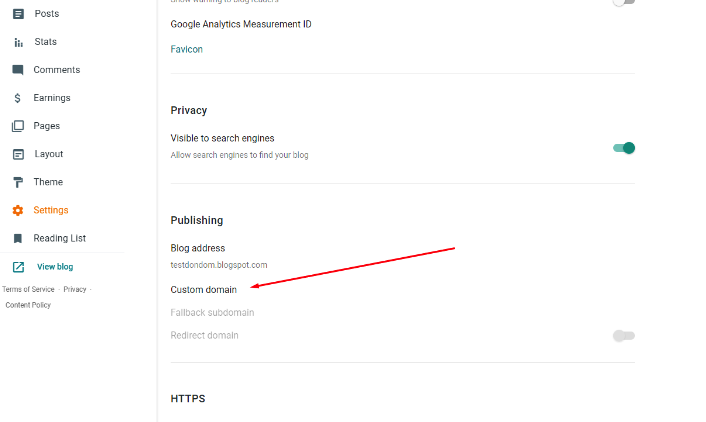
1- Log in to your blogger account and you will see your blogs, you must click on ‘settings’:
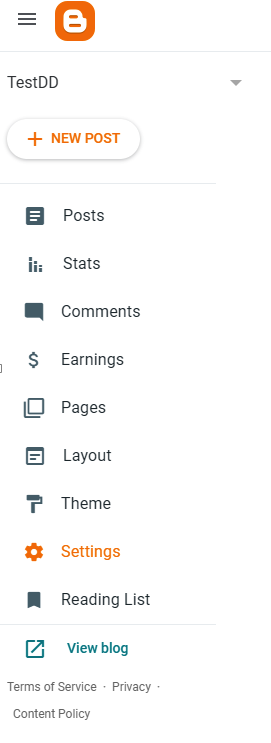
Settings

2- Then click on ‘Custom domain’:

Custom domain

3- Inserting it will provide us with the records to create from your domain management area (the values in the following image are for example only):
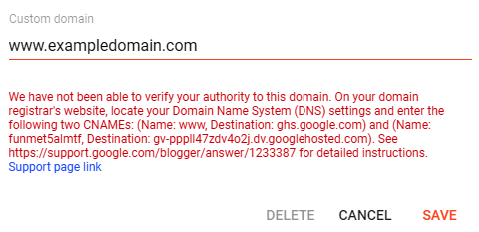
Instruccions

4- We will create these entries from the DNS zone that we will find in ‘Domains - Domains’ by clicking on the domain in question and clicking on the tab ‘DNS zone’. The www. record is created by default in the DNS zone (it is the one that appears at the bottom of the DNS zone), so we simply click on the button to edit it and modify the Destination Host to point to ghs.google.com. For the second CNAME you will need to create a new CNAME entry with the data.The records in this example would look like this:

CNAME

5- To finish, we will repeat the first steps in blogger and the domain will be validated.
Now you just have to wait for Blogger to update its records (don't be impatient, it can take from a few minutes to a few days) and your blog will start working under your new domain.

Frequent Questions

Why DonDominio?

At DonDominio, we offer you over 20 years of experience in the domain registration, hosting, email, and SSL certificates sector.

We have specialized technical support and advanced tools for businesses, agencies, and resellers.

Additionally, we have multiple layers of security, continuous monitoring, redundancy systems, and proprietary technology designed to ensure the availability, integrity, and protection of data.

How to know if a domain is available?

You can find out if a domain is available through a search in our search engine.

How can I register a domain with DonDominio?

Registering a domain at DonDominio is a simple process. Enter the name you want in our search engine to check if it is available, select the appropriate extension, complete the registration, and make the payment.

If you are not sure about the name you want to register, but have an idea in mind, you can activate the AI search in our search engine. In seconds it will provide you with various name options that fit your project.

Once registered, the domain will be linked to your account, and you can use it for a website, email, or any digital project.

How can I create my website?

Steps to create your project at DonDominio:

  1. Search and register a domain for your project.
  2. Create your website and email accounts with our hosting plans.
  3. Protect your project by adding an SSL certificate.
Do you offer specialized technical support?

We have a specialized technical support department with over 20 years of experience in resolving technical issues. All our support agents are real people; we do not use chatbots or AI agents to handle inquiries.

Do I have any benefits as a DonDominio client?

As a DonDominio client, you will have access to special discounts based on the volume of domains you manage.
For more information about this type of discount, check the volume discounts section.

Additionally, you have at your disposal our reseller services which include: developer API, white label panel, and compatibility with WHMCS.