
What are FTP accounts used for?
FTP accounts allow access to your hosting's web space, to upload and download the files that configure your website.
When you activate a hosting service, it already comes with a main FTP user. This user has permissions to edit the entire web space of your hosting.
How to access FTP user management in DonDominio?
FTP account management is done from the management panel of your hosting plan, you can follow these steps to access:
- Log in to your client area with your username and password.
- Go to the "Hosting and Email" section.
- Click on the domain you want to manage.
- You will access the hosting management area. Go to the "FTP" section.
You will see the main FTP user already created. You can use it to access and upload or download files on your hosting.
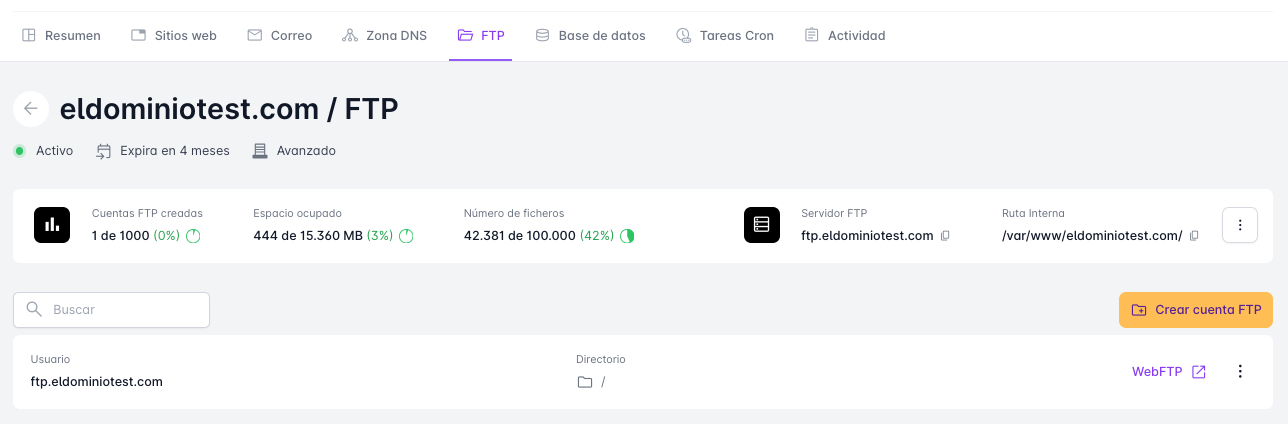
If you have a hosting service in DonDominio, you can create different FTP users.
The advantage of creating different FTP users is that you can grant these users permissions to manage specific folders. This user will only be able to manage files and folders within the directory assigned to them and will not be able to navigate up the directory tree, therefore they will not be able to view or edit folders they do not have permissions for.
How can you create new FTP users?
If you want to create a new FTP user, click on the “Create FTP account” button. On the FTP screen, you can configure it. In addition to the username and password, you can assign a specific directory to that user to manage.
With these options, you can restrict the use of the web space of additional FTP accounts, without them having the option to view other directories if they are at a level above the one assigned to them.
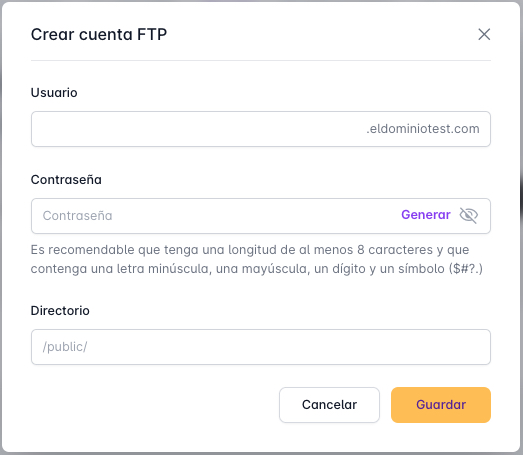
When configuring a new FTP user, you must include the directory where they will have permissions. If you want it to be the complete hosting, you can put /
In the user, you must use a user prefix, whose name will identify that particular user when making the FTP connection. It is also necessary to configure a secure password that includes uppercase, lowercase, symbols, and is unrelated to the domain name.
How to edit or delete an FTP user?
If you want to delete or edit the configuration parameters of an FTP user, you can do so from the FTP section. From there, you can edit the directory assigned to that user and the FTP access password.
- Log in to your client area with your username and password.
- Go to the “Hosting and Email” section.
- Click on the domain you want to manage.
- You will access the hosting management area. Go to the "FTP" section.
You will see a list of created FTP accounts, with an icon to edit and delete them. Keep in mind that the main account cannot be deleted.
In the edit options, you can change the FTP password and the directory. You can also assign a comment to an FTP account to identify it.