
What are Cron Jobs?
A Cron task is a Linux command that allows you to periodically execute a script or command on your website.
Cron tasks are normally used for the periodic execution of scripts related to email, databases, or routine checks. For example, we could create a Cron task that sends a file from our website via email and another that visits a specific website.
At DonDominio, you can configure your own cron tasks from the "Advanced" section of the web hosting management panel, by clicking on "Create Cron Task" and filling in the data that will appear in that section.
How to create a Cron task in DonDominio?
These can only perform queries (of the GET HTTP type) on a file hosted in the hosting plan. These queries can later be reviewed from the server's access LOGs, accessible from your web hosting management panel, under “Websites” -> “View logs”.
You can create a CRON task from the domain hosting management panel, in its "Cron Tasks" section, you can add a new one by clicking on "Create cron task":
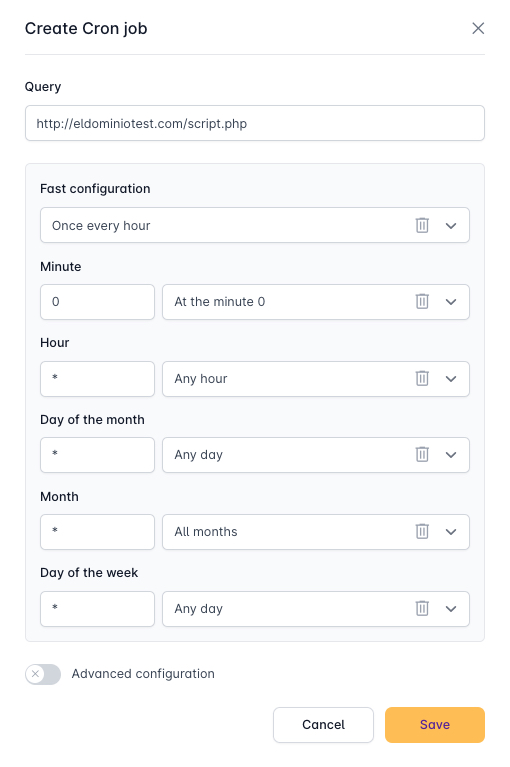
In the previous image, you can see an example of how a very simple cron task configuration would look. In this case, we can see that an HTTP GET type query would be made every hour on the file hosted at “http://www.eldominioquequiero.com/script.php”.
Reviewing the Syntax of cron task configuration, you will see the following:
- Quick Configuration: If you do not want to apply a personalized configuration on the cron task, you can find various examples for quick selection in this section.
- Minute: the first asterisk is the minute of the hour when the command will be executed, ranging from 0 to 59.
- Hour: sets the hour when the command will be executed, ranging from 0 to 23.
- Day of the Month: indicates on which day of the month you prefer the command to be executed, ranging from 1 to 31.
- Month: In this section, you can select the month in which the specified command will be executed, ranging from 1 to 12.
- Day of the Week: determines on which day of the week you prefer the command to be executed, ranging from 0 to 7.
- Comment: You can write an explanatory comment to easily know what intentions you had when creating this cron task.
- Advanced Configuration (HTTP User and Password): Allows creating a username and password to execute the Cron task in question.
The syntax explained above uses asterisks (*), which mean "all" and each represents a temporal value (minute, hour, week...).