
Modify the DNS records
DNS Records Modification on DonDominio
The DNS records of a domain serve to point the domain to the server hosting the content we want to display. These records can be modified at any time from the client area by following these steps:
1 - Access the domain listing
The first step is to access our client area and from there, go to the domain listing.
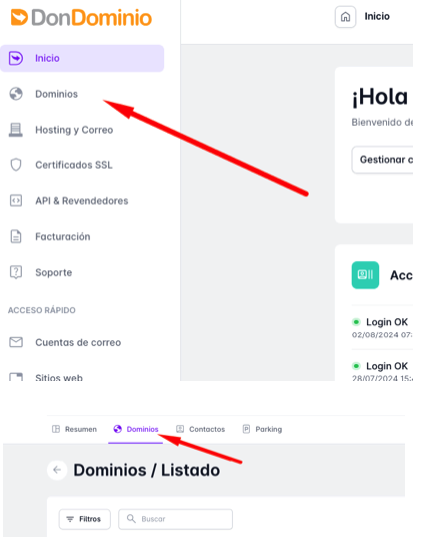
2 - Domain management
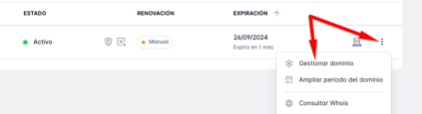
We search for the domain whose DNS records we want to modify and click on the three-dot button that appears on the right side and then "Manage domain".
3 - Modify DNS
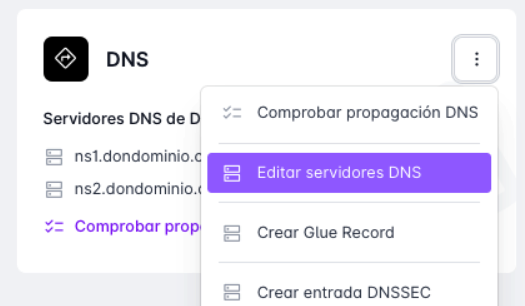
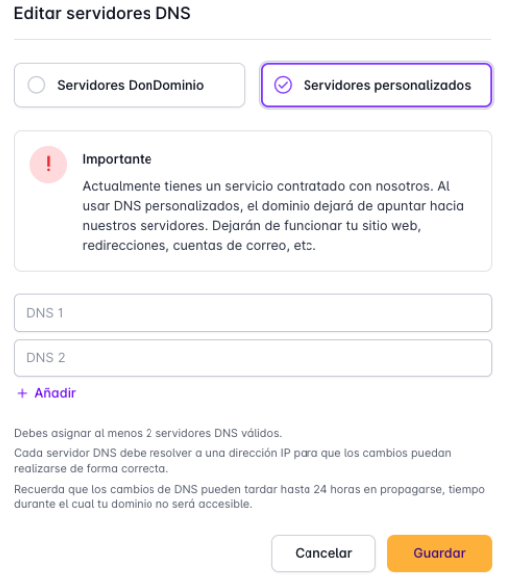
Within domain management, we go to the "DNS" section and click on the three dots and "Edit DNS servers". A pop-up window will open with two options:
1 - DonDominio Servers
This option will configure the DonDominio DNS records, so the domain will point to the hosting you have contracted with us.
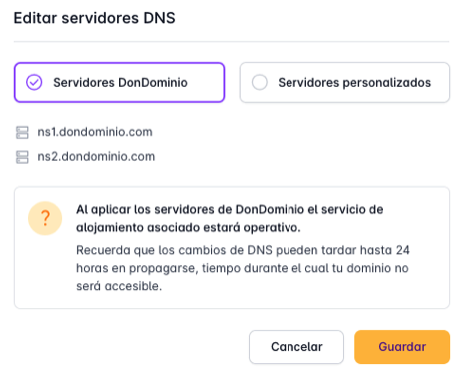
2 - Custom Servers
With this option, we can configure the DNS records of an external provider. We add each DNS server in its corresponding box and click "Save".
After modifying the DNS records, it is necessary for the change to propagate through the network. This process takes between 6 to 12 hours to complete, although it may vary with some domain extensions. If you have doubts about the propagation time, you can check it on the extension information page or contact our support team.
Do you want to change DNS en masse on your domains?
If you want to configure the same DNS on multiple domains, you can do it with bulk changes.
You can check how to do it in our help: How do bulk changes work?